You pay for the connection. Everything past it should belong to
everyone.
A free, decentralised network where anyone can launch their own domain,
share files with no account and no identity attached, and stay reachable
when the Internet is not. If you already pay to be online, what is
inside it should not be for sale.
A network for sharing things, with nobody in the middle
Send someone a file. Put a website online. Both work without an account,
without paying anyone, and without asking permission, and they keep
working when the Internet does not.
Send a fileYou get a link. Whoever you give it to can open it. The server
holding the file cannot: it only ever sees scrambled bytes, and the
part of the link that unscrambles them never reaches it.
Publish a siteYou get an address ending in .capsule. Nobody sold it
to you, nobody renews it, and nobody can hand it to someone else:
the address is your key.
No Internet? Still worksTwo laptops on the same wifi find each other with no DNS and no
uplink. With no network at all, a capsule becomes one file you carry
on a memory stick.
Blocked? Still worksA bridge is a server the network does not list. To anyone scanning
for it, it answers like an ordinary empty website.
Nothing to sign up forNo account, no email, no phone number, no identifier of any kind.
There is nothing to log in to and nothing to delete afterwards.
Underneath, one idea does the work: a server should be able to hold
your data without being able to read it, and the thing that unlocks
it should never travel the same road. Files are encrypted in your
browser; the key rides in the part of a link that browsers never send to
a server.
01Encrypt before uploadAES-256-GCM
02Key in the link fragmentnever sent
03Relays anyone can runone command
04Split k-of-n across relaysReed–Solomon
05Pad to a size classsize hidden
06Strip file metadataEXIF, XMP, ZIP
07Route through a mix--mix
08Publish a .capsule sitesite publish
09Reach a blocked network--bridge
10Work with no internetoffline pack
02: Why
Encryption stopped being the hard part
Every mainstream file service encrypts in transit and at rest. What none
of them do is give up the ability to read the file, and that ability is
what gets subpoenaed, breached, scanned and monetised. The interesting
question is not "is it encrypted" but who holds the key.
The same is true of publishing. A domain is rented, a certificate is
issued, and a host serves the bytes: three parties, each of whom can be
leaned on to make a page disappear or say something else. A
.capsule name has none of them, because the
name and the signing key are the same object.
A relay that could read your file eventually will be asked
to.
the design constraint
03: Capsules
The key goes around the relay
A capsule is a file split into chunks, each encrypted with AES-256-GCM
under a key generated in the browser. The nonce is a random prefix plus
the chunk index, and the associated data binds every chunk to the
protocol version, so a downgrade fails to authenticate rather than
silently succeeding.
The relay sees ciphertext and a size class. It never sees the key.
04: Sites
A name nobody issues, a page nobody can rewrite
capsule site publish ./www packs a folder
into one capsule, stores it on relays, and signs a short record saying
which capsule is the current version of your name. Relays hand that
record out and gossip it to each other. They cannot forge one, they
have no key, and they cannot quietly serve an old one, because every
record carries a sequence number the browser remembers.
Publishing happens once per update. Verifying happens on every visit.
The extension does something ordinary browsers do not: it rebuilds every
page before showing it. Stylesheets, images and fonts from the bundle
become
data: URLs; anything pointing at the open
web is removed; a link that leaves CAPSULE becomes a click you have to
confirm. The result lands in a sandboxed frame with
connect-src 'none' and no scripts.
A .capsule site cannot make a single network request. Not a font,
not a pixel, not a beacon. That is a property of the format, not a
setting you can forget to turn on.
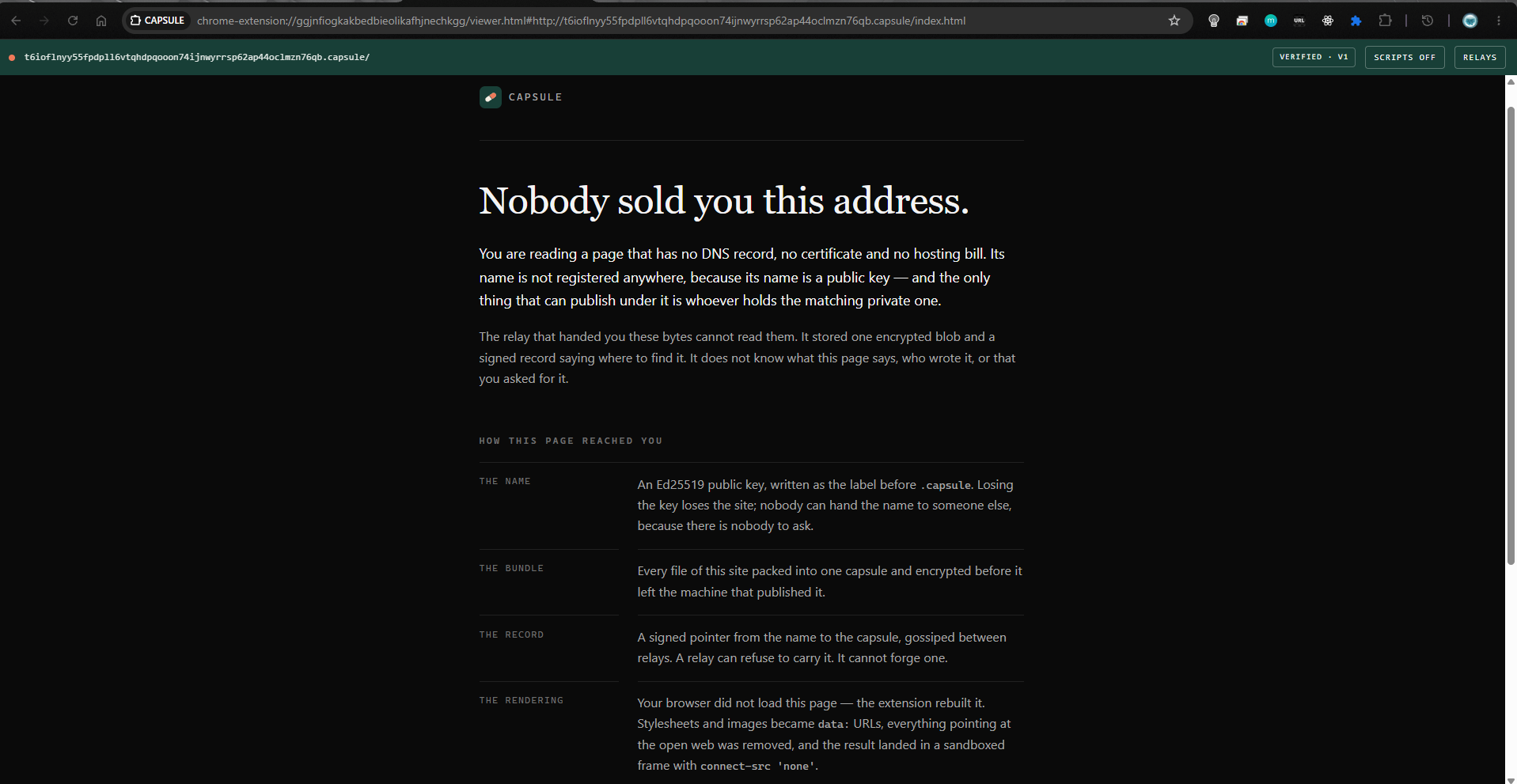
A site under its own name. The bar belongs to the extension, not to
the page: VERIFIED means the signature checked out against the key
inside the name, and SCRIPTS OFF is the default the site has no say
in.
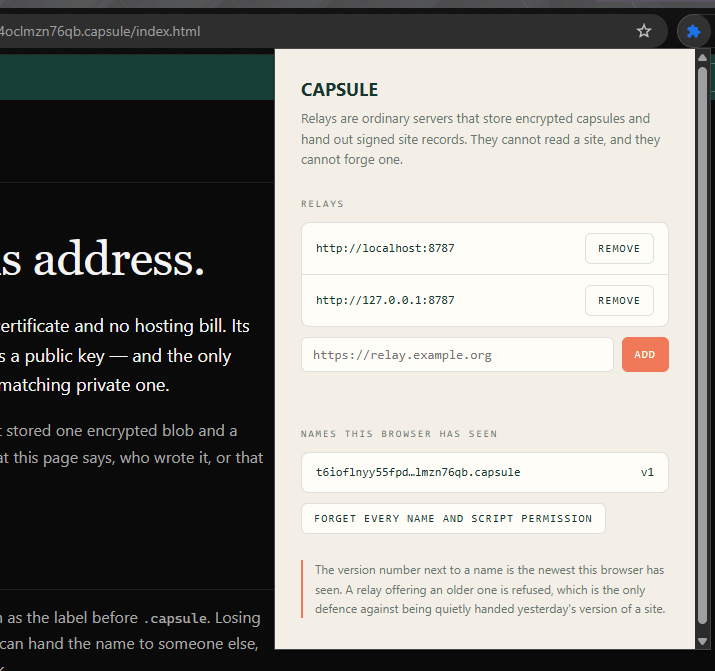
The whole configuration surface: which relays to ask, and the newest
version this browser has accepted for each name. A relay offering an
older one is refused.
05: The mix network
Every hop knows one step, and no hop knows two
Encryption hides what you sent. It does not hide that you sent it, to
whom, or when. With --mix, a request is
wrapped in a Sphinx packet, one layer per hop, every packet exactly
65,920 bytes, and each relay peels one layer, waits a random time, and
forwards. The reply comes back along a second path the destination
cannot see, into a mailbox you poll.
Measured: the storage relay receives zero direct requests from
the client.
None of that matters if there are four nodes and one operator. So the
CLI prints how much protection the live network actually offers
before every mixed send, in those words, and the design
document leads with the same caveat rather than burying it.
$ capsule send report.pdf
--mix --anonymous
Mix network: 4 nodes across 2 operators, 3 hops: small.
This hides you from a curious relay, not from someone watching the
network.
Two tables. The first is what CAPSULE was built to do differently. The
second is every other system on the map, with the limitation it is known
for and whether CAPSULE answers it, often only partly.
CAPSULE
Tor
IPFS
Nostr
Matrix
Briar
Server cannot read the content
✓
~
,
,
~
✓
No account, no identifier
✓
✓
,
,
,
,
Content size hidden from the host
✓
,
,
,
,
,
Resists end-to-end timing correlation
✓
,
,
,
,
~
Split so no single host has enough
✓
,
,
,
,
,
Content can be withdrawn
✓
~
,
~
~
✓
Self-certifying site names
✓
✓
~
,
,
,
Pages cannot phone home
✓
~
,
,
,
,
Readable in an unmodified browser
✓
,
~
✓
✓
,
Works with no internet at all
✓
,
,
,
,
✓
Censorship-resistant transport
✓
✓
~
~
,
✓
General-purpose TCP tunnel
WIP
✓
,
,
,
,
Designed for anonymity that grows with users
✓
~
,
,
,
~
✓ by design and tested · ~ partly · WIP
designed, not built · , not addressed.
This table is about the design. What the network is today is
smaller, and therefore weaker, than the design allows: the
threat model
says exactly where.
Everything else on the map, and what it says it
cannot do
Each of these solves a real problem well. The limitation quoted is the
one that system is known for; the last column is whether CAPSULE
addresses it, and the answer is often "partly" or "no".
System
Its stated limitation
CAPSULE
Tor
Slow, TCP only, vulnerable to correlation by an observer of both ends
partly
I2P
Installation and technical experience; not oriented to the conventional internet
yes
Nym
More protection means far more latency; too slow for daily use
partly
Lokinet
Smaller anonymity set than Tor, and a dependency on a token network
partly
Hyphanet (Freenet)
Content is hard to withdraw; aged performance and UX
yes
GNUnet
Research-oriented
yes
SimpleX
Depends on relays; no true offline physical network
yes
Session
Persistent identifier, own network and token, complexity
The protocol does not yet achieve unlinkable presence
n/a
Nostr
Pseudonymous not anonymous; spam; key management; inconsistent deletion
yes
Matrix
Servers replicate accounts, metadata and history; not anonymous
yes
Waku
A hard balance between privacy, bandwidth, availability and latency
partly
IPFS
Not private: PeerIDs, CIDs, providers and queries can be public
yes
Hypercore / Pear
Peers see IPs; somebody has to stay online
yes
Yggdrasil
Encryption is not anonymity
yes
Reticulum
Small ecosystem, complicated onboarding
partly
Meshtastic
Needs hardware and has little bandwidth
partly
Veilid
A framework: an application still has to be built
yes
Iroh / libp2p
Toolkits, not networks with end users
yes
Bitcoin / Lightning
Traceability and custody complexity
n/a
07: Run it
Four commands to join the network
01
InstallNode 22 or newer. git clone,
npm install, npm run build. No database,
no accounts, no keys to obtain.Install, step by step →
02
Send a filecapsule send secret.pdf --anonymous prints a link.
The person you give it to needs nothing installed.Send, receive and delete →
03
Run a relayOne process with a public URL. It joins the network by gossip,
stores only ciphertext, and keeps no addresses in its logs by
default. Until you do, clients reach the network through the
genesis relay below. It needs a machine others can reach from
the internet.Run one and check that it joined →
04
Publish a sitecapsule site key then
capsule site publish ./www. Load the extension from
apps/extension/dist and open the address it
printed. ./www is any folder with an
index.html in it; the viewer needs a Chromium
browser.Publish and read a site →
$ git clone
https://github.com/missingus3r/CAPSULE && cd CAPSULE
$ npm install && npm run build
$ npm run dev:relay
# a local relay on :8787, for trying things out
$ node apps/cli/dist/index.js site publish
./www --key site.capsulekey
Published 4 files (1.4 KiB)
Name: http://6dijvuvwrd5jq…kbwat2yb.capsule/
Resolves: 1 relay(s)
npm run dev:relay is a relay only your own
machine can reach. To join the public network, set
CAPSULE_PUBLIC_URL to an address others can
reach and point
CAPSULE_PEERS at the genesis relay below.
Gossip does the rest:
what happens next, and how to check it worked.
08: For an agent
One line, and something else does the reading
If you use Claude Code, Codex or anything like them, each of these is a
single line to paste. The first one is first on purpose: you are about
to run code from a stranger on the internet, and an agent is good at
telling you what it does before it does it.
Check whether this is safe to run
Audit https://github.com/missingus3r/CAPSULE before I run anything:
read the build scripts, the postinstall hooks and the network calls,
tell me every host it contacts and every file it writes outside the
repo, and say plainly whether you would run it.
Install the client and send a file
Clone https://github.com/missingus3r/CAPSULE, run npm install and
npm run build, then send me a test file with the CLI and give me the
share link. Do not start a relay: the default one is already
configured.
Run a relay and join the network
Clone https://github.com/missingus3r/CAPSULE and run a CAPSULE relay
on this machine as a systemd service. Read docs/RUN_A_RELAY.md
first, set CAPSULE_PUBLIC_URL to an address others can reach, point
CAPSULE_PEERS at the genesis relay, and tell me what the relay can
see about the people who use it.
The last clause of each is the point. An agent that reports what a relay
observes, or what a build script touches, is more useful than one that
just finishes.
09: Stack
Boring choices, on purpose
Nothing here is novel cryptography. Every primitive is one that has been
looked at for years by people better at this than we are; the work is in
the composition, and the composition is the part that has not been
audited.
The part after # is not decoration. A pinned seed has to
sign a challenge the client generated a moment ago, so seizing the
name, the certificate or the host is not enough to stand in for it:
only the key can answer. The hostname is that address,
68.211.136.69, spelled so a certificate can exist for it.
The /relay after it is where the relay is mounted,
because that host also serves another site, and it is part of the
address.
One relay run by one person is not a network. It sees the address, the
timing and the size of everything sent through it, and mix routing
across relays a single party operates protects nobody. Running your
own is the point, not a formality.
What the relay actually stores
The record on disk
A capsule directory holds an encrypted manifest, the ciphertext
chunks, and three hashed tokens. Nothing in it names the file, its
type, its owner or its size in the clear.
capsule-id/
  manifest.bin      encrypted: filename, mime, note, chunk map
  chunks/0000.bin   AES-256-GCM, identical length for every chunk
  chunks/0001.bin
  meta.json         expiry, chunk count, SHA-256 of each token
Why the chunks are all the same size
Padding rounds the plaintext up to a size class in quarter-octave
steps with a 64 KiB floor, then to a whole number of chunks. A 1.4 KiB
site and a 60 KiB site are both stored as 64 KiB. The relay learns a
bucket, not a size, and erasure coding needs equal chunks anyway, so
the two features pay for each other.
The three tokens
Read, write and delete are separate capabilities, stored as SHA-256
digests and compared in constant time. Handing someone a share link
gives them read and nothing else; the delete token stays with the
sender.
Splitting across relays
k-of-n erasure coding gives each relay one Reed–Solomon shard
per chunk. Any k relays can rebuild the capsule and any
k−1 have nothing, not a partial file, not a shorter file,
nothing that decrypts.
Ugly and unmemorable, and that is the price of nobody having to issue
it. The checksum protects against nothing: it exists so a mistyped
name fails in the browser instead of resolving somewhere else.
The record
A signed statement: version N of this name is that capability.
Relays store and gossip it. They cannot forge one, and a client keeps
the highest sequence number it has seen, so a relay cannot quietly
serve yesterday's version either. A record outlives the capsule it
points at, so a relay forgets one once every relay it names says the
site is gone: a name that resolves leads somewhere.
What the extension does before rendering
Parse
Name → public key. No fallback, no search suggestion.
strict
Resolve
Ask several relays; verify every answer against the key.
signed
Compare
Sequence must not go backwards for this name.
pinned
Rebuild
Assets become data: URLs, outside references are removed.
rewritten
Sandbox
Opaque origin, no scripts, connect-src 'none'.
sealed
Scripts
Off by default, and the guarantee is absolute while they are: the page
cannot issue a network request of any kind. They can be enabled per
site, with a visible warning: a script can navigate the frame to an
outside address, and no CSP directive covers navigation since
navigate-to left the standard.
Permissions
The extension ships with no host permissions. Access to a relay is
requested when you add it, for that origin only, and given back when
you remove it.
The packet format, and what it costs
One shape for every packet
Header
α (32) ‖ β (320) ‖ γ (32)
384 B
Body
LIONESS wide-block permutation
65,536 B
Total
Identical for a real packet and a cover loop
65,920 B
Hops
Space is reserved for the maximum regardless
5
What each property buys
No hop knows its position. The header is always the same length
and the consumed block is replaced with pseudorandom filler the sender
computed. A property of the format, not of the implementation.
A packet cannot be followed between links. The ephemeral point
is blinded at each hop and the body is decrypted one layer, so the
bytes change completely.
A packet cannot be marked. LIONESS is a permutation over the
whole body: flip one bit and all 64 KiB randomise, and the destination
rejects it.
No hop reveals why it dropped something. Every response is
202. Anything else would be an oracle about the packet's
contents.
What it costs
Latency
Exponential delay per hop, tunable, default 2s mean
seconds
Bandwidth
Every payload padded to 64 KiB, plus cover loops
high
Guard nodes
None: the first hop is re-chosen every request
open
n−1 attack
Made expensive by loops, not solved
open
Before it can be called anonymous
Independent operators in different jurisdictions; enough users to hide
in; published measurements; an external cryptographic review of this
composition; and a reasoned decision about guard nodes. Until those
five exist, the correct phrase is "mix network", not "anonymity
network", and the interface says it that way.
Reading list and specifications
What CAPSULE is built out of
Sphinx
Danezis & Goldberg,
Sphinx: A Compact and Provably Secure Mix Format (2009)
packets
Loopix
Piotrowska et al., The Loopix Anonymity System (2017)
delays
LIONESS
Anderson & Biham,
Two Practical and Provably Secure Block Ciphers (1996)
body
Onion names
Tor Rendezvous Specification v3
names
Reed–Solomon
Cauchy generator matrix over GF(2⁸)
shards
Shamir
Threshold sharing over GF(256)
recovery
Documents in the repository
PROTOCOL.md, the capsule format, byte for byte, with
official byte vectors. THREAT_MODEL.md, what is defended, what is not, and what is
explicitly out of scope. MIXNET.md, the mix network design, leading with its own
limitation. SITES.md, names, records, bundles and how the extension
renders them. COMPARISON.md, the 21-system table, in full, with where each
claim can be verified. RUN_A_RELAY.md, running one, including what an operator can
and cannot see.
Conformance
The protocol ships official byte vectors, so a second implementation
can prove it agrees before anyone trusts it with a file. Releases
carry a CycloneDX SBOM and SHA256SUMS.